
If a PDF looks correct but pasting into a plain text editor produces different characters, check the cause before changing fonts or running OCR. The mapping between the shape drawn on the page and the character it represents may be wrong. Correcting these PDF text errors starts with identifying which part of that process failed.
Why can text look right but copy incorrectly?
PDF text content can store font-specific source character codes rather than Unicode text. A PDF reader uses the font and encoding information to locate and draw a glyph. Copying also requires translating those codes into meaningful characters.
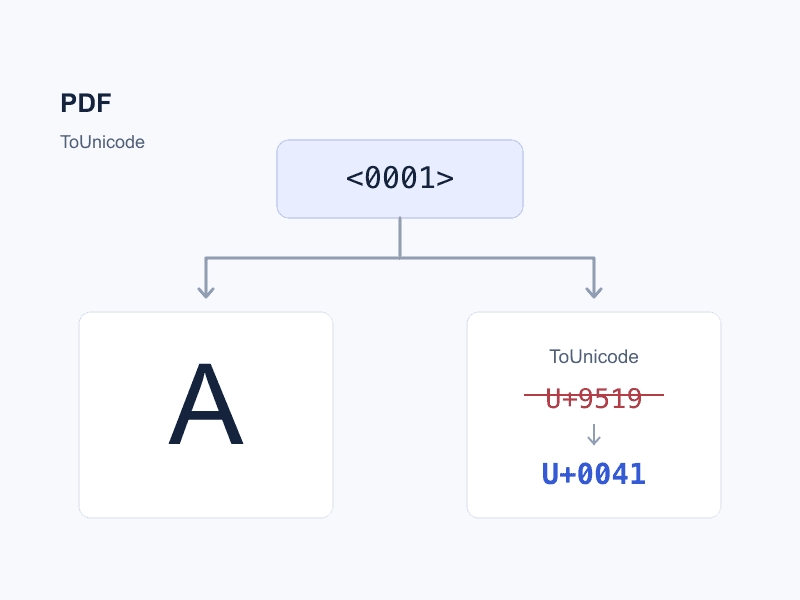
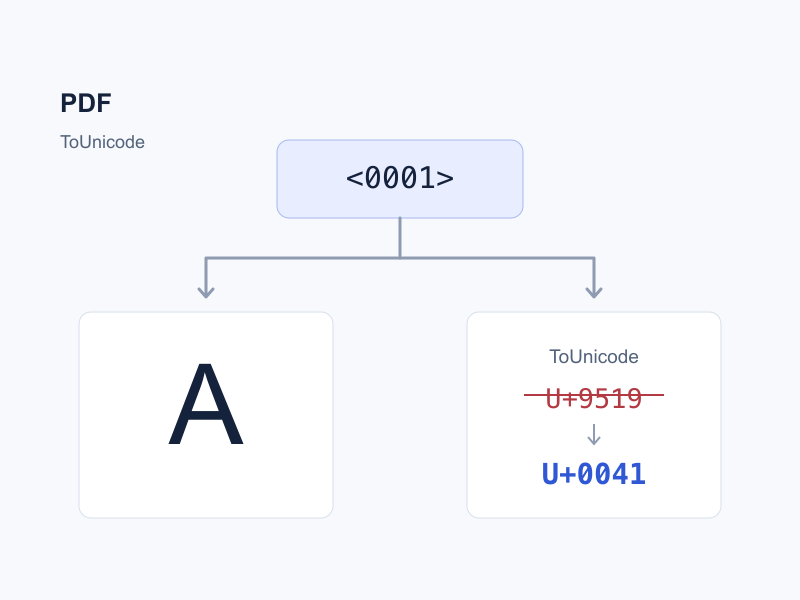
Drawing the letter A therefore does not guarantee that extraction will return A. ToUnicode is a mapping in a font dictionary that associates PDF source character codes with Unicode character sequences. This distinction between displaying and extracting text is described in Adobe PDF Reference, section 5.9.
What does font mapping actually mean?
These three concepts are related, but they are not interchangeable:
| Mapping | Main role |
|---|---|
The cmap table inside a font file | Maps character codes to glyph indices; Unicode subtables use Unicode codes |
| PDF Encoding; composite fonts can use an Encoding CMap | Interprets PDF source character codes and helps locate the glyph to draw |
PDF ToUnicode | Maps PDF source character codes to Unicode text for copying and extraction |
For the first kind, see the OpenType cmap specification. The repair discussed here targets the third; it does not rebuild the font file or replace the glyphs on the page.
A missing ToUnicode mapping does not always cause garbled text. A PDF reader can sometimes recover text from a standard encoding, known glyph names or a character collection. Conversely, a mapping table can exist and still contain incorrect associations.
First check whether the mapping is the problem
Copy a short passage into a plain text editor and compare it with the original page:
| Symptom | What to check first |
|---|---|
| The page looks correct, but copied characters consistently turn into other characters | Missing or incorrect character mappings |
| You can select only an image, not text | A missing text layer or text converted to outlines; consider the source file or OCR |
| Text can be selected on a scanned page, but it does not match the image | Recognition results in the OCR text layer |
| Individual characters are correct, but columns or tables are out of order | Reading order and layout extraction |
| The page itself contains missing characters or boxes | Font resources, glyph coverage or display encoding |
These are troubleshooting clues, not diagnoses based on appearance alone. Font embedding and correct copying are also separate concerns; see PDF font embedding and subsets.
How can you correct copied text using the original glyphs?
Suppose the source code <0001> in a particular font draws A but incorrectly maps to 错 (U+9519). This is an illustrative mapping fragment, not a complete CMap file:
Before: <0001> <9519>
After:  <0001> <0041>
<0001> is a PDF source code in that font, not the Unicode character U+0001. Mapping it to U+0041 specifies that the glyph represents A. A ligature (several letters sharing one glyph) may also need to map to several Unicode characters, such as fi.
Once you have confirmed that mapping repair is appropriate, use the PDF text repair tool:
- Select the PDF, then select the font to correct.
- Compare the original glyphs in the grid and enter the correct text beneath each glyph.
- Export the repaired PDF and keep the original for comparison.
A change applies everywhere the same font and source code are used. Check distinct fonts separately, even when their names match. If OCR misrecognized just one word, globally remapping a character may also damage text that was already correct.
How do you verify the repair?
Reopen the exported file and copy and search for sample text in your target PDF reader. Check other occurrences of the same code and fonts you did not edit. Compare the page appearance and inspect punctuation, ligatures and numbers, rather than testing only the first incorrect character.
Some PDFs also use ActualText to supply replacement text, which supporting software may prefer. If changing ToUnicode does not resolve the problem, check for this override. The current tool warns about ActualText but does not edit it. See the PDF Association explanation.
For OCR errors, correct or recognize the text layer again. If you have the original layout file, consider correcting it and exporting a new PDF. Files that will not open or trigger structural errors need a different approach; see when PDF format repair is appropriate.
Once you have identified a font character mapping problem, correct it with the local PDF text repair tool. Files are processed in your browser without uploading them. You should still verify the copied text and page appearance after exporting.